Plan and review your day
One page per trading day — plan before the open, mark your trades on or off plan, and review after the close.
Journal → Days gives every trading day its own page. Days with trades appear on their own; Plan today starts today's page. The page autosaves as you go: there's nothing to click to save.
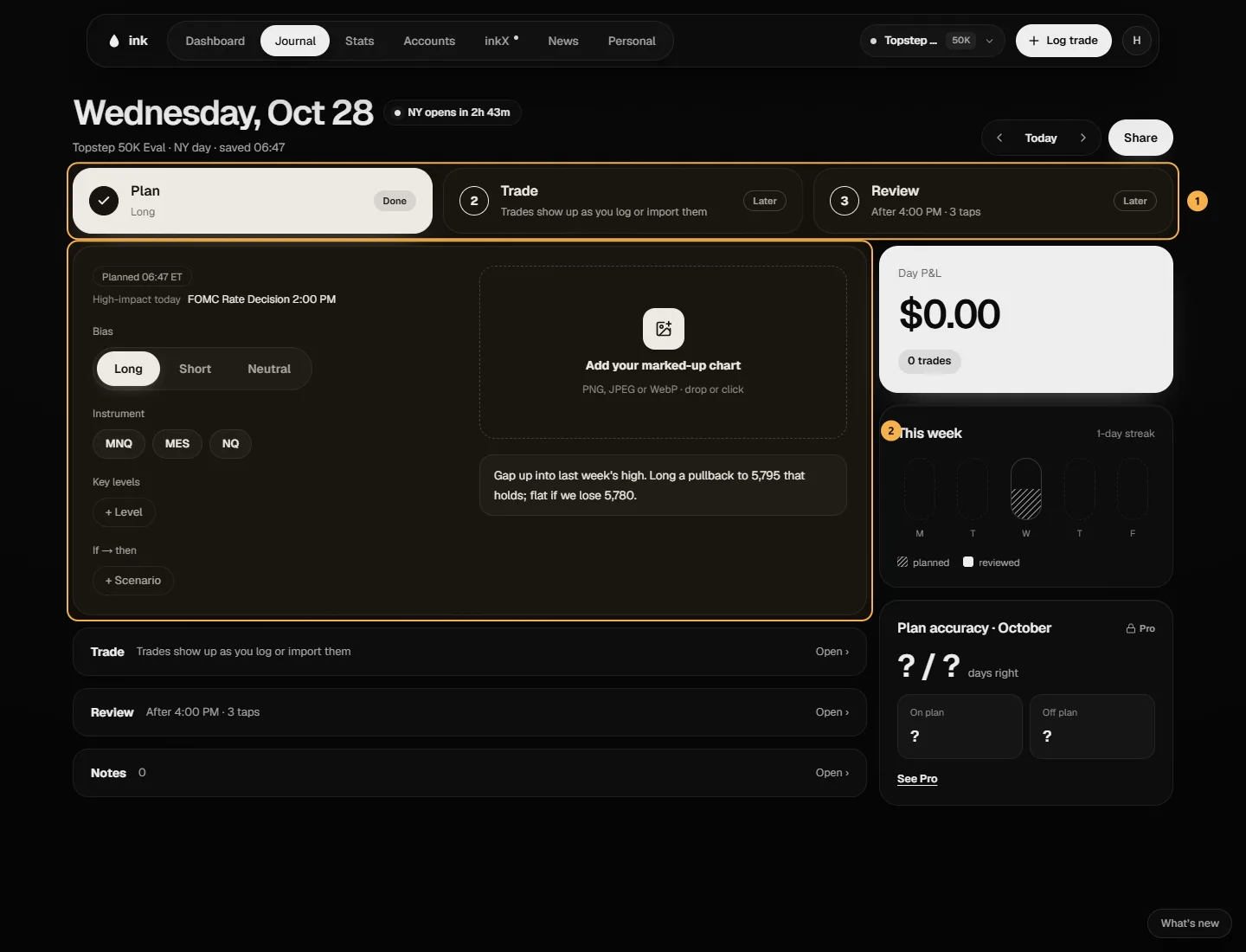
Across the top are three cards, Plan, Trade and Review. Tap one to open it; the other two stay below as rows. The page opens on the stage the clock says you're in: Plan before 9:30am ET, Trade during the session, Review after 4:00pm. On today's page a chip shows how long the New York session has left.
Plan
- Bias: long, short or neutral. Then pick the Instrument.
- Key levels: tap + Level, then type a name (PDH) and a price. Tap a level to change it. Up to 12.
- If → then: tap + Scenario for each "if this happens, I'll do that". Up to 8.
- Your marked-up charts: up to 3 screenshots a day on Free, 5 on Pro. Paste one anywhere on the page, drop it, click Paste your chart, or Paste link for a TradingView link. Give each a Label, Replace it, or drag the thumbnails to reorder them — the first is the day's cover. The time of the latest one shows under them ("Marked-up · 9:12 ET"). Below them is the plan itself.
A plan first saved after 9:30am ET is marked "Written after open". Changes after the open — screenshots included — are marked "Edited after open", and your original plan, with every screenshot it had, stays under Saved before the open.
Ink removes photo data (like location) from every screenshot before storing it.
At the top of the Plan you'll see the high-impact news releases for the day (more on News, where Add to day plan adds a release here as an If → then), and the Next time items from your last review.
Trade
Today's trades are the trades that closed that New York day, on all your accounts. Mark each one On plan or Off plan: you decide, Ink doesn't work it out. A trade you marked Partly on its own page keeps that mark here. Paste one chart of the whole session with ⌘V (Paste the session chart).
Review
Answer Was the plan right?: Correct, Partly, Wrong or No trade. Under Plan vs what happened (Pro), write what You said and what the Market did in your own words. On Free, lines you wrote before stay on the day, read-only. Under Next time, tap a suggestion: your own most-used items first, then a few starters. You can also type your own. Then write what you'd repeat, and tap Finish the day.
A day counts as reviewed for your planning streak once it has a verdict or a written review.
On the right
- Day P&L: the day's net on the account you have selected, as in its calendar cell, with how many of its trades were on plan.
- This week: your streak, with each weekday planned and reviewed.
- Plan accuracy (Pro): for the day's month, how many judged days your plan was right: Correct ÷ (Correct + Partly + Wrong) (
computePlanAccuracy,lib/days/day-stats.ts). No trade days don't count either way. One square per judged day; On plan and Off plan are the month's net for those trades.
Example (made-up days). 9 reviews: 5 Correct, 2 Wrong, 1 Partly, 1 No trade → 5 ÷ 8 = 63%, "5 / 8 days right".
Share makes a P&L card of the day, or posts your plan and review with Share to inkX. Notes you've linked to the day are under Notes.
The Days list
Filter by Planned, Reviewed or Needs review, and switch between gallery and list. Use Previous day and Next day to move between days. Building the habit? See Your planning streak.