Review a trade
A trade's page — its net P&L, R, images, fills, review and journal — and how to add images, review it or delete it.
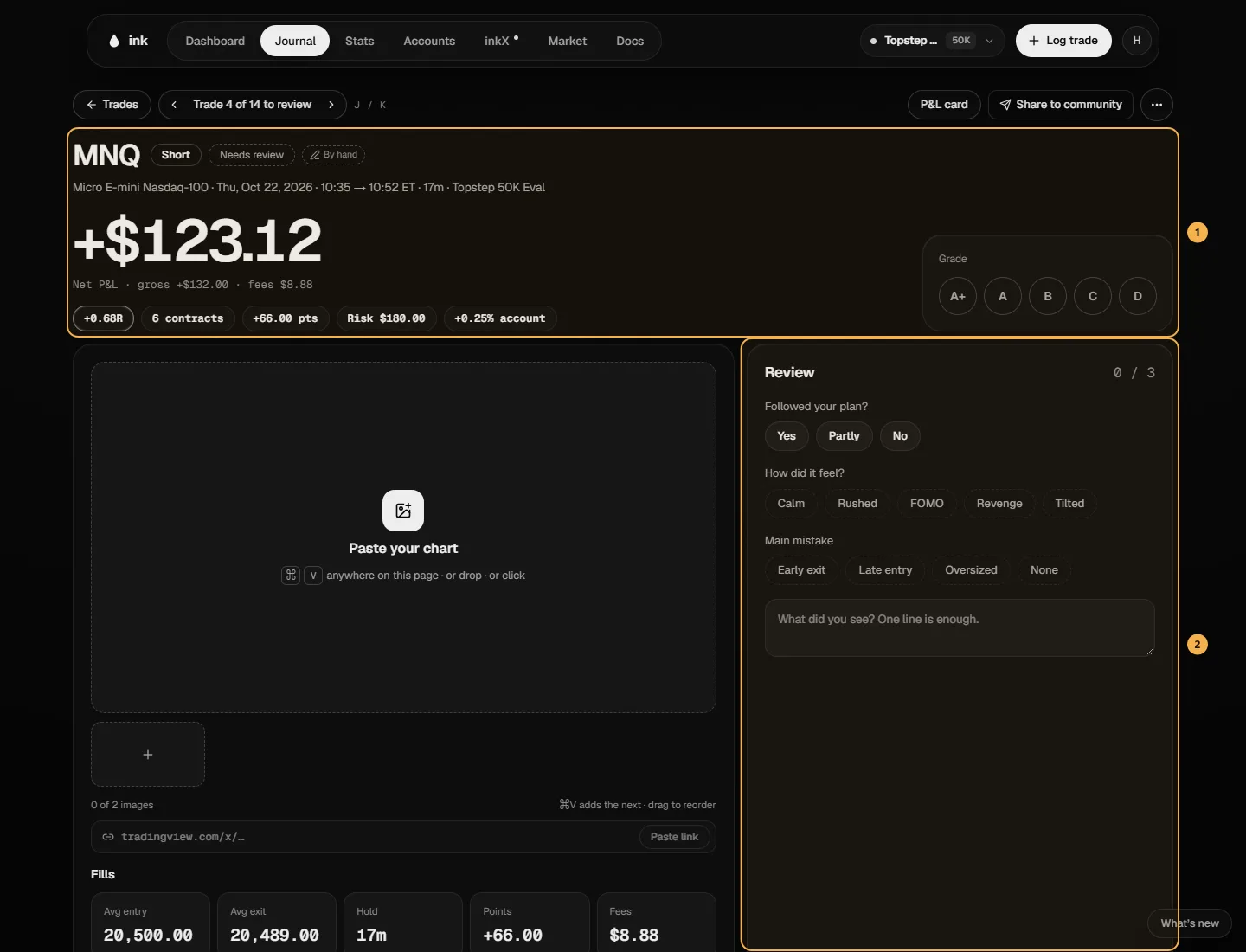
Click any trade to open its page: everything about that one trade in one place. At the top, ‹ Trade 12 of 54 to review › steps through the trades still waiting for a review (J / K on a keyboard).
What's on it
- The header — symbol, long or short, Needs review or Reviewed, the date, times, how long you held it and the account. Every trade says where it came from: Imported · Tradovate, Imported · TopstepX or By hand — and Imported · edited once you've changed an imported trade's numbers. It's a label, not a verification: a CSV can be edited before it's uploaded. A trade logged to several accounts says which accounts it was copied to.
- Net P&L — the big number is after fees; the gross and the fees sit under it. Then the trade's R, contracts, points and risk (No risk set when there's none).
- Grade — tap one; tap it again to clear it.
- Images and the trade — your charts, then the trade itself: a Result trade says Logged as a result (Add fills to enter them); a fills trade shows Fills — Avg entry, Avg exit, Hold, points, fees and every fill. An imported trade you've edited has Reset to imported values.
- Review — Followed your plan? (Yes, Partly or No), How did it feel? (your feeling tags — Calm, Rushed, FOMO, Revenge and Tilted are offered too), Main mistake and a note. Save review saves them together. A trade is reviewed once it has a plan answer and a grade.
- Tags — Session, Strategy with its setup criteria, your tags (add or remove them here) and the Rules you followed (a Broke tag on any you broke).
- On your account — where the account stood after this trade: the room to the fail line, To target (or payout days on a funded account) and Daily loss used that session — the same numbers Log trade showed for it.
- Your 5 PM trades — every trade you opened in the same hour on this account, all time: how many, the win rate and the net.
R
R is the trade's net P&L (after fees) divided by the risk amount you set for it (computeRMultiple, lib/trade-stats.ts). No risk amount, no R.
Example (made-up trade). Risk amount $150, net P&L +$225 → +1.5R. A −$75 loser on the same risk is −0.5R.
Points are the move in points per contract.
Main mistake
The mistake chips are your mistake tags. Early exit, Late entry and Oversized are offered too — each becomes one of your tags only when you save it on a trade, and if you already have a tag with that name (any capitals) that tag is used, so old and new trades stay together under one tag. Feelings work the same way. Your other tags (setups, sessions) never show in these rows. None counts as an answer (a "No mistake" tag), so it's different from leaving it blank. Mistakes are tags everywhere else: the Journal can filter by them like any tag.
Images
Up to 3 images a trade on Free, 5 on Pro. Ink removes photo data (like location) from every image before storing it. Paste one anywhere on the page, drop it, or click Paste your chart; a TradingView link (tradingview.com/x/…) works too — Paste link. Give an image a Label (HTF, Entry, Exit or your own words), Replace it, or drag the thumbnails to reorder them — the first is the cover your Journal gallery and shares use.
Delete a trade
… → Delete trade, then confirm "Delete this trade?". It can't be undone: the trade, its journal and its images are removed. An imported trade's raw fills are kept, so they're never lost — they just aren't part of a trade any more.
To change a trade instead, use Edit trade (or Move to another account) — see Edit a trade.