Track costs and payouts
Log what you spend on evaluations and what firms pay you, and see your prop net across every firm.
Trading P&L is only half the story of a prop career — the other half is what you pay firms and what they pay you. Ink keeps that separately.
Log a cost or a payout
On Accounts, use an account card's + Cost or + Payout — or Add cost / Add payout at the top of Accounts → Fee tracker. Pick the type, the Amount and the Date. On the Fee tracker, Add an entry logs one in three taps — what, which account, how much — dated today.
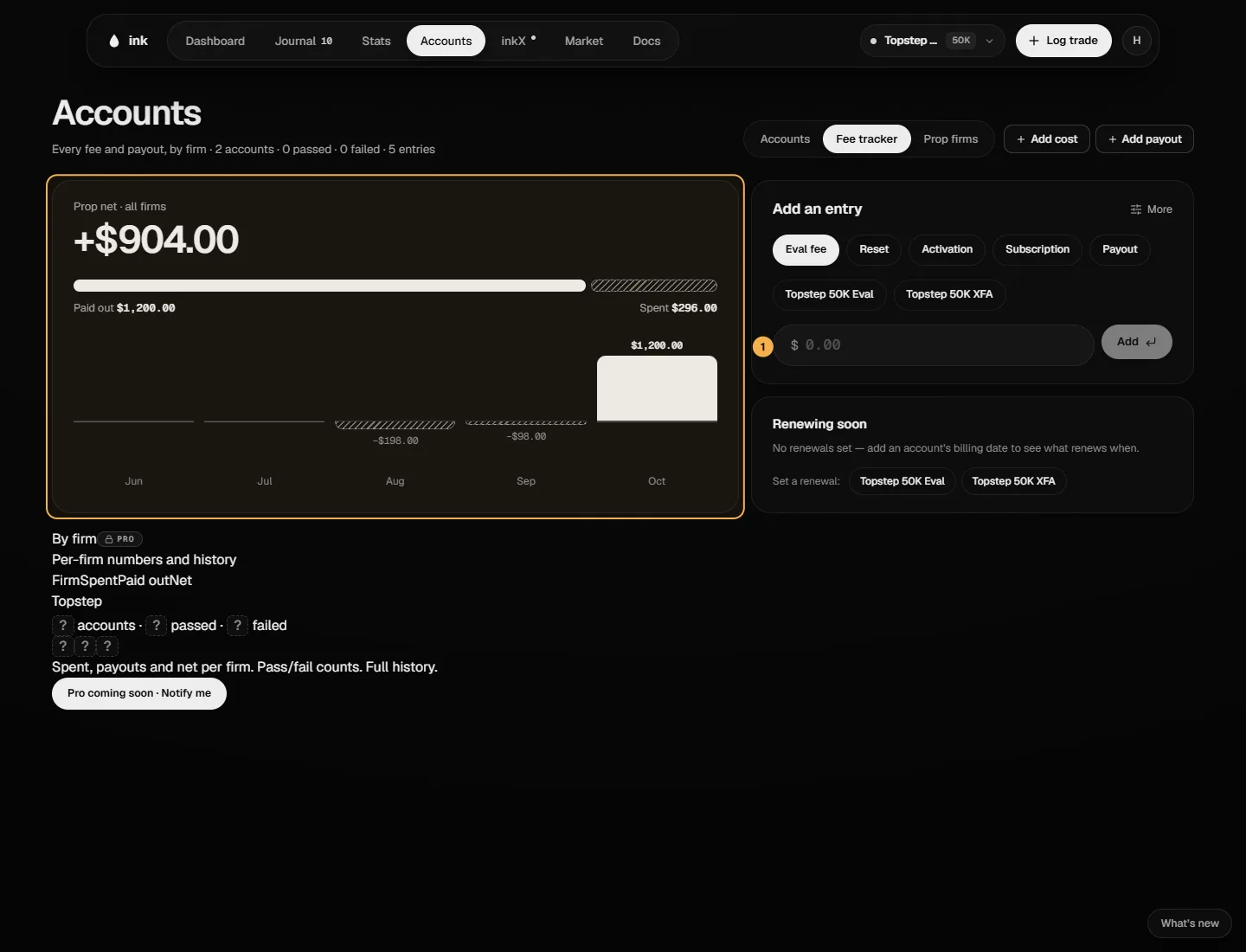
- Costs: Eval fee, Reset, Activation, Subscription or Other.
- Payouts: money a firm paid you.
- No account (firm-level) — for a cost that isn't tied to one account, like a monthly subscription; pick the Prop firm instead.
Ink suggests the likely type: the first cost on an evaluation is an eval fee, later ones resets; on a funded account, activation.
On a funded account, the Dashboard's Balance card also has Record a payout. For a payout the dialog says which date to pick for your firm — "The day you requested it", "The day it was approved" or "The day the payout period completed" — because payout days and consistency since your last payout count from the session after it. See Which date to record a payout under.
Where it shows
- An account card's ⋯ menu has Costs & payouts, with that account's net.
- Accounts → Fee tracker shows your Prop net · all firms — "Payouts − costs. Separate from trading P&L." — with Paid out, Spent, how many times over you've been paid back ("2.5× back" = paid out ÷ spent), the last five months, By firm and the Ledger of every entry. By firm and the Ledger are Pro; on Free you see the totals and which firms you have entries for.
How the totals are worked out (lib/prop/transactions.ts):
- Paid out = the sum of payouts.
- Spent = the sum of everything else. A refund logged as Other (money in) reduces Spent.
- Net = Paid out − Spent.
Example (made-up numbers). Eval fee $150, reset $80, payout $1,000 → Spent $230, Paid out $1,000, Net +$770.
Renewals
Renewing soon on the Fee tracker lists every account you've given a monthly billing date: the next renewal (rolled forward month by month from the date you set; the 31st lands on a shorter month's last day) and the amount. Set, change or clear it right there. Remind me puts a bell in your notifications the day before — never an email, and it's never logged as a cost for you.
An account that's passed, blown or closed but still renewing is marked "still billed", and the header totals it: "$… renewing on dead accounts".
Payouts and your drawdown
A payout logged on an account lowers that account's balance from its date, which the drawdown uses — the dialog says "This payout lowers the balance Ink measures your drawdown against." On an account whose firm measures the drawdown on gross profit (Payouts lower the drawdown balance off), it says "This payout stays in the balance your drawdown is measured against." instead. See Drawdown. Costs never touch the account's balance or your trading P&L.