Log one trade to several accounts
Trading the same idea on several prop accounts? Log it once and Ink saves a copy on each — with each account's own size. Pro.
If you copy-trade across accounts, you don't have to log the same trade five times. With Ink Pro, Log trade can save it to several accounts in one go.
Log to several accounts
- Open Log trade and enter the trade as usual — see Log a trade by hand.
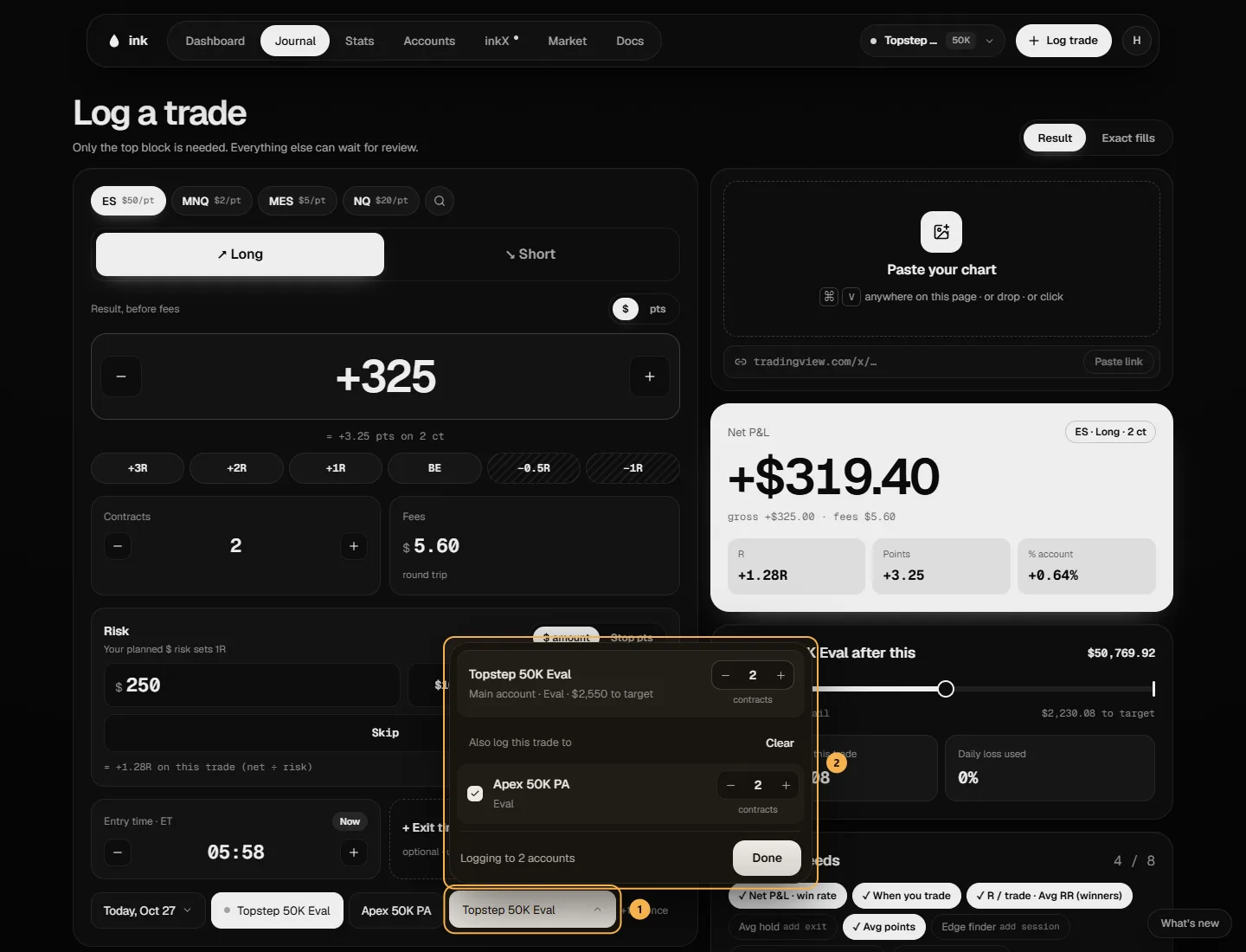
- Pick the trade's account in the account row, then click its name under Several at once. At the top is that account with its contracts — the same number as the form's Contracts box, so changing one changes the other. With exact fills it reads from fills.
- Under Also log this trade to, tick the other accounts, or Select all for every active one. Each row shows how much room a funded account has ("Funded · $2,000 room") or how far an evaluation is from its target ("Eval · $1,250 to target").
- Each ticked account has its own contracts. It starts at the trade's size — change it for an account that trades smaller or larger.
- Click Done. It now says "+1 at once", and the save button Log to 2 accounts (the count follows how many you picked).
If a size can't work, that row says why and Done stays off until you fix it. With Result, a copy has to come out in whole ticks: +$3.50 on 2 MNQ contracts is 7 ticks, which can't be split onto 1 contract, so that row shows Not whole ticks.
What gets saved
- One trade per account, each with its own P&L. Ink rebuilds each copy from the same fills at that account's quantity — it never just multiplies the dollars.
- The same journal on every copy — session, strategy, tags, grade, notes and rules. A planned risk amount scales with each copy's quantity.
- The chart, if you added one, on every copy. Deleting one copy's chart never touches the others.
All the copies are saved together: if one can't be saved, none are, and Ink tells you why. Each account can be picked once.
Free plan
Log trade on Free doesn't show Several at once — Free has one active account, so there's nothing to copy to.