Log a trade by hand
Enter a trade that isn't in a broker file — as a result (fast) or with its exact fills — then the journal notes, with Log trade.
Log trade records a trade you've already made — Ink never places orders. Use it for a trade that isn't in a file you can import.
Log the trade
- Click Log trade in the navigation bar. No account yet? Ink shows Create your first account instead — every trade is logged to an account.
- Pick the instrument (it starts on the one from your last trade), Long or Short, then enter the trade — as a Result (the fast way) or with its Exact fills (below).
- Fees fill themselves in from your last trade on the same instrument and account that had fees (an imported one first) — the badge names that trade; tap the field to change them.
- Risk sets your 1R — type it, pick $100 / $250 / $500, give a stop in points (Stop pts), or Skip.
- The entry time starts at Now (New York, ET); + Exit time adds the exit. Underneath, pick the day and the account — Several at once (Pro) logs the same trade to other accounts.
- Optional: your charts (Paste your chart — paste, drop or click; or a TradingView link with Paste link) and Journal it — session, grade, strategy, tags, notes and the rules you followed.
- Click Log trade, or press ⌘↵ / Ctrl+Enter. Ink opens the saved trade and shows Trade logged. Discard throws the entry away — if you've entered anything, it asks first (Discard this trade?, or Keep editing).
The Net P&L card updates as you type, with the same numbers the trade will have once saved: the net after fees, R (net ÷ risk), points and % account (of the starting balance). Beside it, where the account will stand after this trade — the room to the fail line, the target or payout, daily loss and your daily rules. This trade feeds shows what the fields you've filled add to your stats. On a phone, Log trade stays at the bottom of the screen.
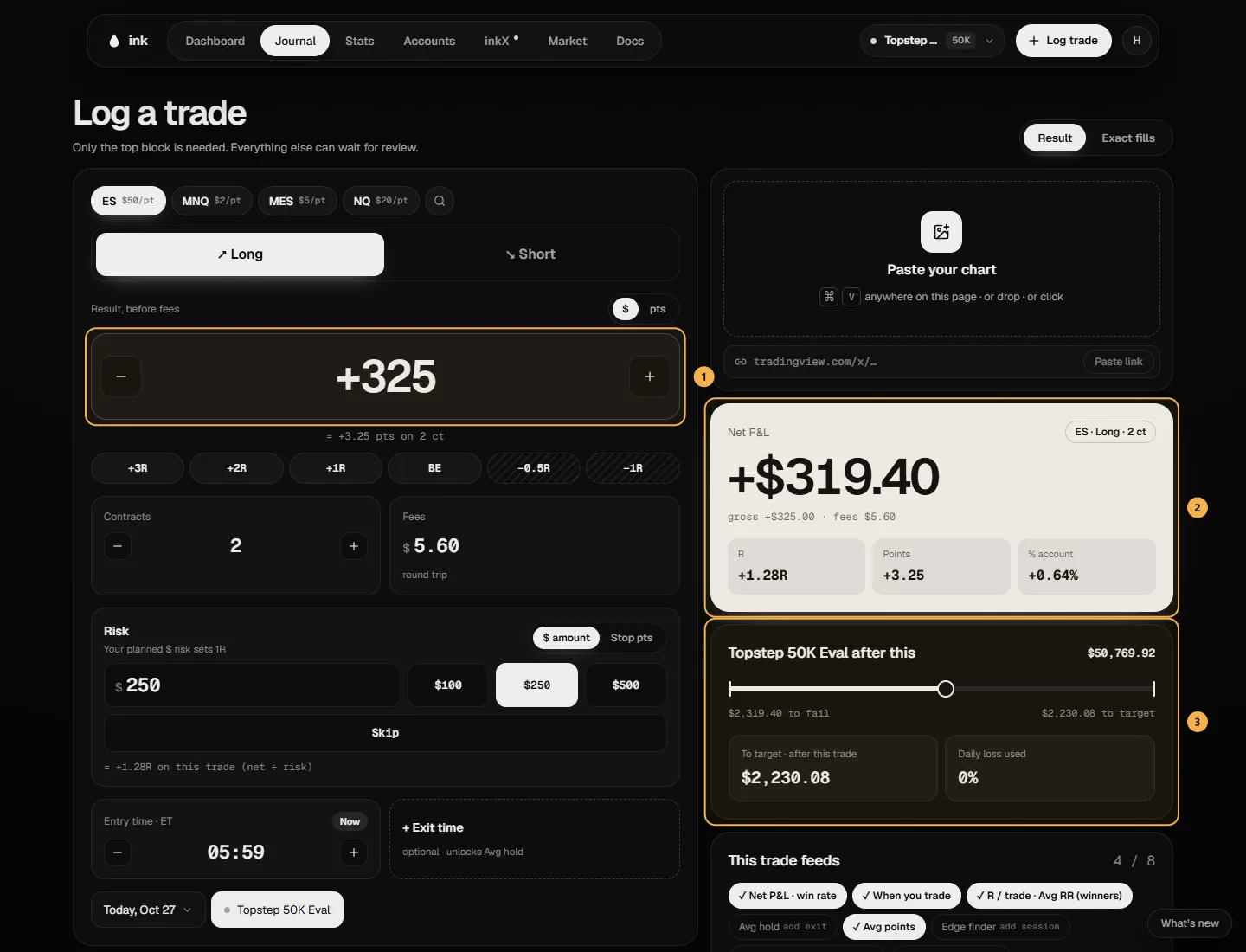
Result
Enter the Result, before fees — in dollars for the whole trade, or in points per contract (switch with $ / pts); the − / + buttons step a point at a time. Ink shows the other unit underneath, e.g. "= +0.46 pts on 2 ct". With a risk set, +3R … −1R fill in that many R before fees — the trade's own R is a little lower once fees come off. Then the Contracts and the entry time.
A futures result is always a whole number of ticks: on CL ($10 a tick) $920 is fine, $925 isn't — Ink tells you rather than rounding it. A Result trade has no fills or prices: its page says Logged as a result, and P&L cards leave out the entry and exit. Without an exit time, its hold time is unknown and left out of your average hold time.
Exact fills
Enter each fill: Buy or Sell, the quantity, the price and the time (ET). Use Add exit for the exit, then Add partial fill for every extra entry or exit. Fees go on the exit. Long / Short flips every fill. The fills must go from flat back to flat as one round trip — see How fills become trades.
A field that's missing or wrong is marked as soon as you leave it, with what to fix underneath.
CFD & forex trades
On a CFD & Forex account, the instruments are NAS100, US30, US500, gold (XAUUSD) and 7 major pairs: EURUSD, GBPUSD, AUDUSD, NZDUSD, USDJPY, USDCHF and USDCAD. Pick one from the chips or More, or type in the search field: it knows common names like gold, nasdaq, dow, cable or yen. You log each trade as a result, with the numbers your platform shows:
- Lots — in 0.01 steps.
- Result, before commission & swap — in dollars, for the whole trade.
- Pips — optional, the price move, to one decimal. Ink never works it out from the dollars, so left empty it stays empty.
- Commission — $0 or more. Ink doesn't fill it in from an earlier trade.
- Swap — the overnight charge or credit. Use a minus for a charge.
Net = result − commission + swap. A $125.40 result with $7.00 commission and −$2.15 swap nets $116.25.
Exact fills and Stop pts aren't available here, so risk is a dollar amount. Several at once only offers other CFD & Forex accounts, at the same lots. CFD trades are logged by hand for now: CSV import is for futures files.
Fixing a trade later
Open the trade and click Edit to change it or its journal. A trade you log is labelled "By hand"; an imported trade you edit is labelled "Imported · edited". A CFD trade edits the same fields it was logged with.
On the Free plan
There's no limit on how many trades you log, on Free or Pro. Logging one trade to several accounts at once is Pro.