Set up your first prop account
Add your evaluation or funded account — pick the firm, the plan and the size, and Ink fills in the rules for you.
Every trade in Ink belongs to an account — usually one of your prop firm evaluations or funded accounts. Add it first, and Ink can track it against the firm's rules from your first trade.
Add the account
- Go to Accounts and click Create account. (With no account yet, the Dashboard shows the same button.)
- Work through the four steps — Continue moves on, Back goes back, Do this later leaves:
| Step | What you choose |
|---|---|
| Firm | Pick your firm. Firms you already have accounts with come first, under Your firms (with how many accounts), then All firms (with how many plans), and you can search. Not listed? Add firm manually — a prop account with its rules entered by hand. Not a prop account? Personal account (below). |
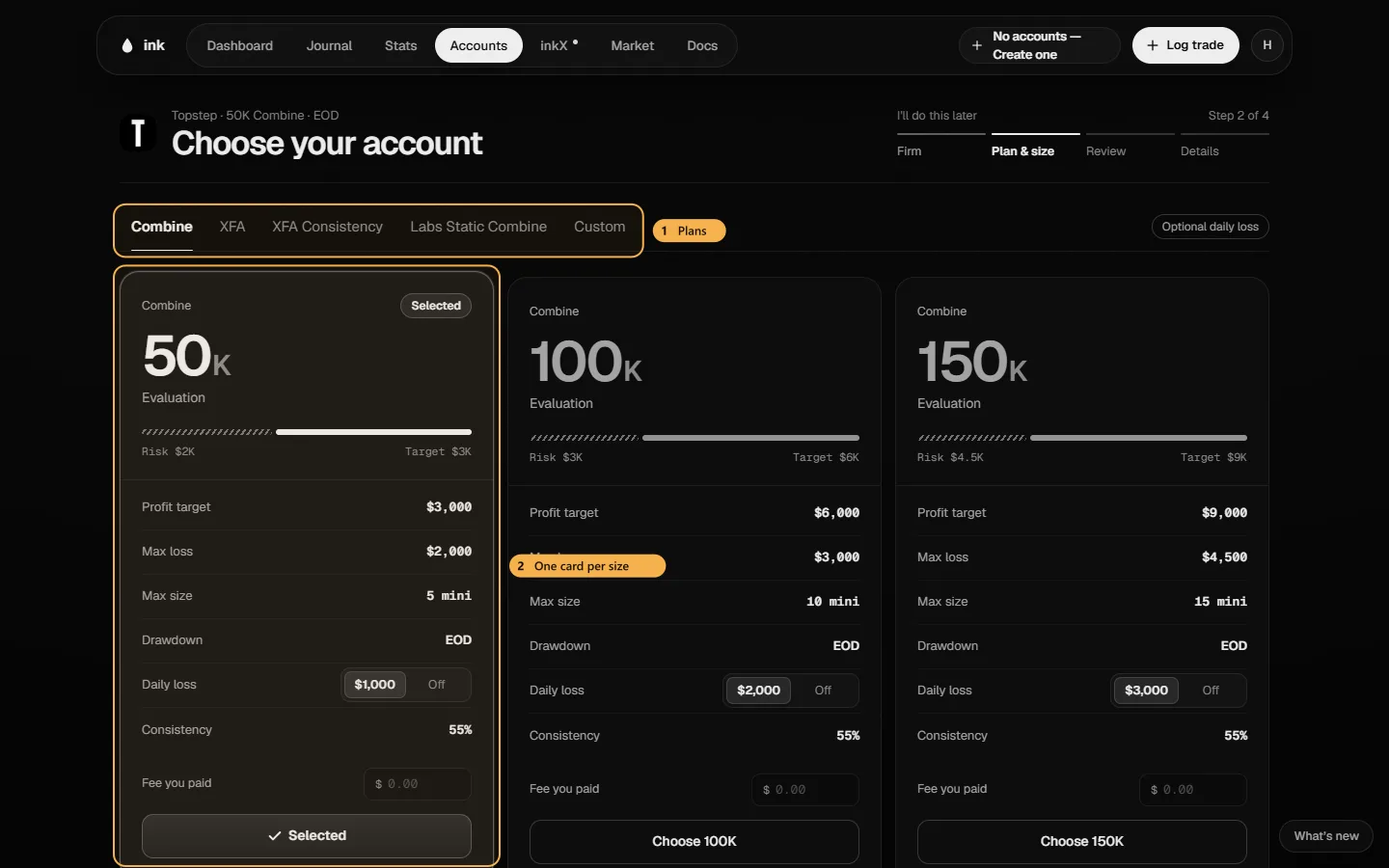
| Plan & size | The firm's plans are tabs; each account size is a card with its profit target, max loss, max size and drawdown type. Where the firm lets you choose the drawdown type or a consistency add-on at purchase, the card has a switch. Pick a card — it turns solid. Custom skips the presets: you enter the phase and starting balance. |
| Rules | Six tiles with the firm's rules filled in — on an evaluation the profit target, max loss, daily loss, max size, consistency and min days; on a funded account the payout days and least profit per day instead of the target. Click a tile to change it: − / + or the slider, and options such as the drawdown type (EOD trailing, Intraday, Static), where the floor stops, Soft / Hard daily loss, or what consistency is measured against. A changed tile says Edited — click it to put the firm's value back, or Reset all. The account card on the right updates as you go. On an evaluation, Funded rules shows the firm's funded stage (read-only — those are set when you pass). Rules the firm has that Ink can't track are marked Not tracked. Accept the firm's rules (or save your edits), then Continue →. |
| Details | Name (Ink suggests some), Account number (optional — Paste or Add later), Balance (new, or Already trading — below), How many (one or more with the same rules), Fee you paid (optional — logged as a cost on the account, with the date you paid), and how Trades come in: Import a file or Log by hand. Click Create account. |
All set then shows the new account card in place. Import trades → opens the import with the new account picked, Log first trade → opens the Journal, and Add another starts again from the firm.
A personal account
Trading your own money? Personal account opens a window over the firm list: Market & size (the market and the Starting balance), Your rules — Stop for the day (a daily loss), a Max loss below the starting balance, and max contracts, each on or off — then Details (the name, and Already trading with the current balance if the account isn't new). A personal account has no firm, no target, no consistency or payout rules, and no costs or payouts.
Add firm manually opens the same kind of window: Firm, size & rules — the Firm name (filled in from your search), the market, evaluation or funded, the size, and the rules with − / + — then Details.
CFD & forex accounts
An account's Market is Futures (the default) or CFD & Forex. You choose it on Market & size for a personal account, on Firm, size & rules for a firm added by hand, or on Plan & size with Custom. Firm plan cards are futures plans, so a CFD prop account uses Custom and you enter its rules yourself.
The market sets three things:
- Instruments — a CFD & Forex account only takes CFD and forex instruments, and a futures account only takes futures.
- How you log — lots and a dollar result, with optional pips, commission and swap. See CFD & forex trades.
- The trading day — 5pm ET for CFD & Forex, 6pm ET for futures. See The trading session.
The market is set when you add the account and locks once the account has trades. To trade another market, add another account.
On an evaluation, Rules shows the target, consistency and min days, and hides the payout rules. On a funded account there's no target; the payout tiles are shown instead.
Several accounts at once
Bought more than one of the same account? Set How many (up to 20). Ink adds them together — named "#1", "#2" and so on — each with its own account number, and logs the fee once per account.
Already trading it?
Choose Already trading on Details and enter where the account stands today. See Add an account you're already trading.
What the rules do
The rules power the Dashboard's rule tiles — how much room you have before max loss, today's loss against the daily limit, your progress to the profit target and consistency. The daily loss limit is measured per trading session: 6pm–5pm ET on a futures account, 5pm–5pm ET on a CFD & Forex account.
On the Free plan
Free includes one active account, and any number of archived ones. Adding a second active account asks you to archive one instead — or Ink Pro has unlimited accounts.
Next: Your first week.