Your first week: import, review, plan
A simple routine — get your trades in, journal each one, and plan and review your days.
A journal only helps if it's complete and you look at it. Here's a routine that takes a few minutes a day.
1. Get your trades in
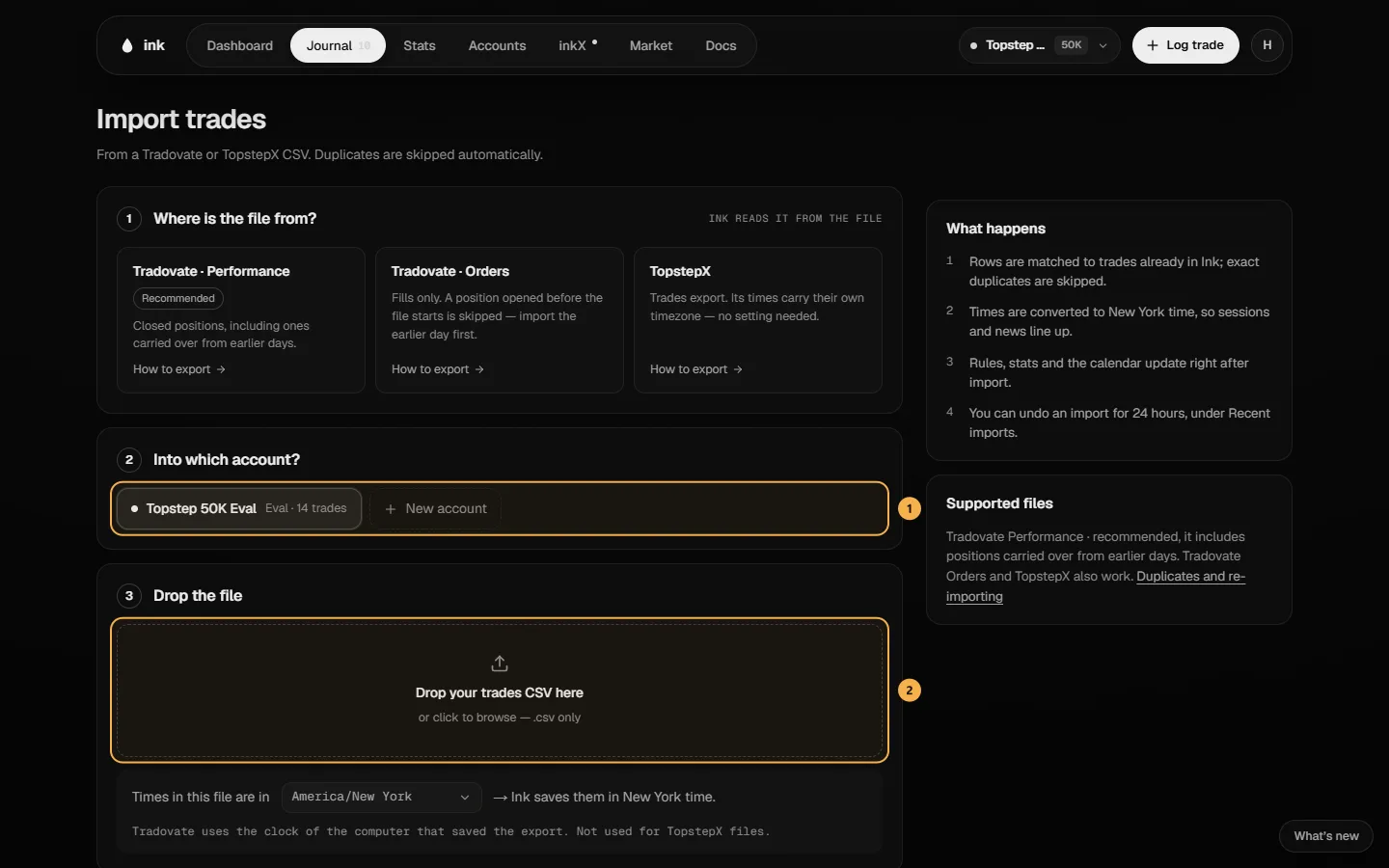
Import a file — the fastest way:
- Go to Journal → Trades and click Import — or Import a CSV if you don't have any trades yet.
- Under Into which account?, pick the account the trades belong to.
- Drop your CSV on Drop your trades CSV here, or click to browse. Ink reads Tradovate Performance (recommended), Tradovate Orders and TopstepX files.
- For a Tradovate file, check Times in this file are in — the time zone of the computer the file was exported on. Ink shows the time of your first trade so you can check it.
- Click Import trades.
Or log a trade by hand with Log trade in the navigation bar — for a trade that isn't in a file.
2. Journal each trade
Ink records the facts — instrument, side, size, prices, times, fees and P&L. The why is yours to add:
- Open the trade from Trades and click Edit.
- Under Journal it, fill in what matters to you:
- Session and + Strategy — when you traded and which setup it was.
- Setup criteria — tick the strategy's conditions that were really there.
- Grade — how well you executed.
- Risk (beside the trade's numbers) — what you planned to lose on the whole trade. It sets your 1R, so Ink can show the trade in R.
- A note — anything you want to remember.
- Rules — tap each rule you kept or broke.
- Click Save changes.
Over time this is what makes your stats useful: win rate by strategy, by session, and in R.
3. Plan and review your days
Every trading day has its own page under Journal → Days.
- Before the open — Plan. Pick your bias, mark Key levels and add If → then scenarios. The page autosaves as you go. If you change the plan after the 9:30 ET open, Ink marks it edited and keeps the original.
- After the close — Review. Answer Was the plan right? (Correct, Partly, Wrong or No trade), add what you'll do next time, and tap Finish the day.
4. Look at the week
At the end of the week, open the Dashboard: the calendar shows each day's P&L, and the rule tiles show how each account stands against its firm's rules. Stats breaks your results down further.
New to the rules? Read Set up your first prop account.