Card styles
Share a period P&L card as Ink classic or in the Ink frame with your theme, a saved theme or your own picture.
When you Share a day, week, month, year or all time, Card style picks how the card looks. Every style is free.
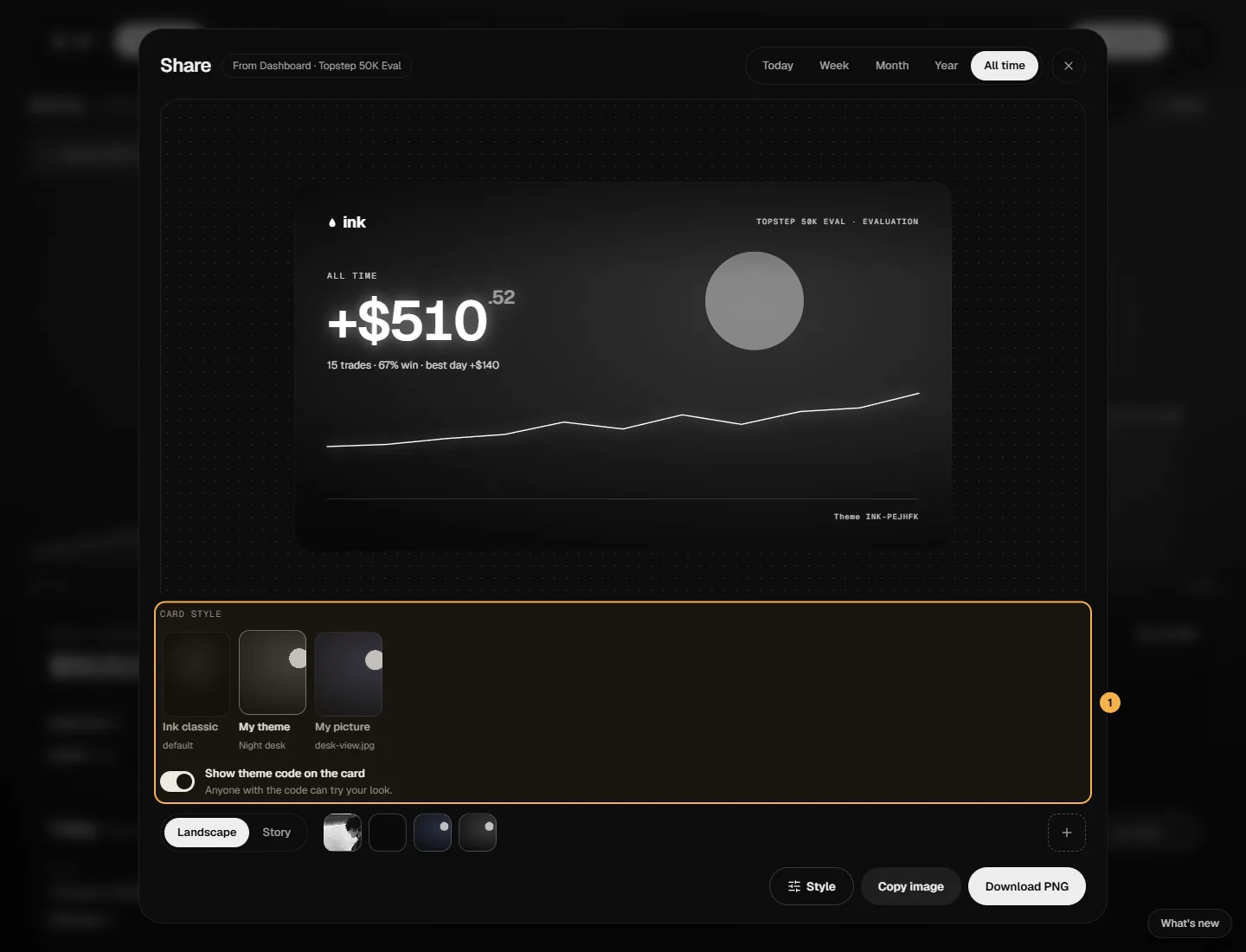
The styles
- Ink classic — the card as it has always been, with every option in the studio (number style, colors, video backgrounds).
- My theme — the theme you're wearing, in the Ink frame.
- Any theme you've saved in the Marketplace, by name.
- My picture — your own card background upload (from the studio), in the Ink frame.
The Ink frame is the same on every card — the ink mark, your account and range, the glowing number, the curve, your @handle and the theme's code — so it's recognizable in a feed. From the theme it takes the background picture, its brightness, and your win/loss colors only if you've turned colors on.
Theme styles export as images, in Landscape or Story. Video backgrounds stay on Ink classic.
The theme code
Show theme code on the card (on by default) prints the theme's code in the corner. Anyone with the code can try your look. Earned themes print Earned theme instead, and with the switch off the card says inklyn.app.
With Use as my default on, your style and the switch are kept for your next share.