The Dashboard
The P&L hero, the Today, Balance and Daily stop cards, Your shape, the session dial, goals, the trading calendar and Needs you.
The Dashboard is the selected account at a glance. Switch account with the pill above the total (or swipe it on a phone).
The P&L hero
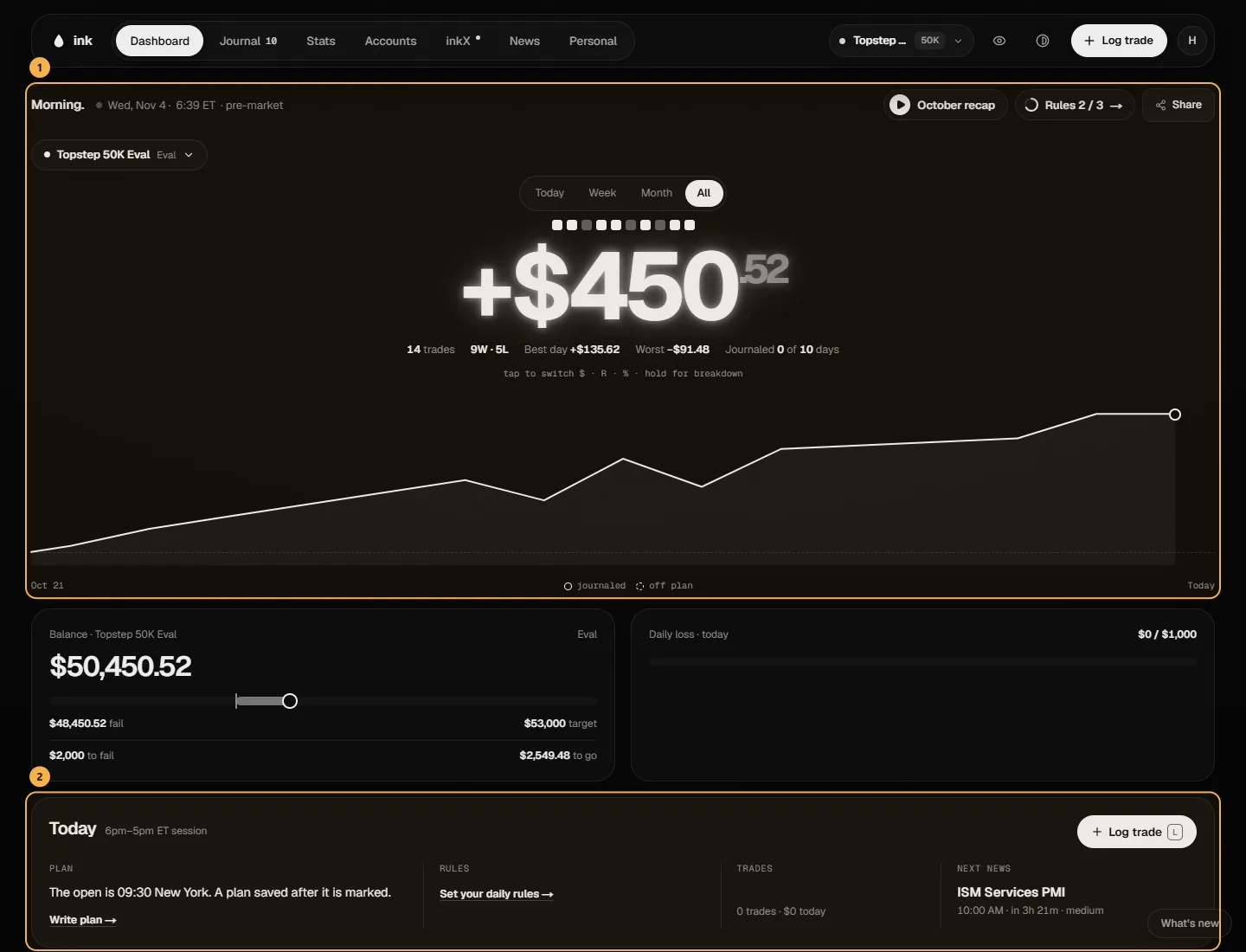
The big number is the account's net for the period you pick under it: Today, Week, Month or All. A trade belongs to the day it closed.
- Tap the number to switch between dollars, R (net ÷ planned risk; trades without a planned risk are left out) and % of the starting balance.
- Hold it for the breakdown: winners, losers and fees, which add up to the net to the cent.
- The bars are your trading days. Hover a bar for its day, or drag across them to see the total as of that day.
- The squares are your last 10 trades (filled = win).
Today, Balance and Daily stop
- Today — your plan, today's rules (checked against this session's trades), the trades so far and the Next news release. Log trade opens the logger.
- Balance — starting balance + any P&L before you started logging + your logged trades − payouts, drawn over your last 30 sessions. With a drawdown rule, the floor runs under it and Room to max loss is the gap between them. On a funded account, Record a payout is here.
- Daily stop — what is left today (an estimate: open positions aren't known) of the tighter of the firm's daily loss limit and your own day stop, labelled with which one it is; it resets at the account's trading-day start. No stop on either side: quick amounts to set your own. See Daily loss limit.
Your shape (Pro)
Six spokes from your own trades, This week or This month, with the period before dashed: rules kept, consistency (best day ÷ profit, against the account's limit if it has one), risk (losses that stayed within 1R), profit factor, R per trade and journaling (days reviewed). Hover a spoke for its value; the panel starts on your Weakest spoke, and Show me the days → opens those days in the Journal. It needs 10 trades in the period. A spoke with no data (no planned risk, say) is left out, never drawn as zero.
When you make money (Pro)
The session dial: one spoke per half hour you actually traded (by entry time, New York), longer = more money, outward for profit, inward for loss. The panel shows your Best window, how much of your gross profit came before it ended, and what you gave back after. Hover a losing half hour to see what sitting it out would have kept. Filter by weekday. It needs 20 trades in the last 90 days.
Goals
Up to three of your active goals as rings, from Personal. No goals yet: Set a goal →. See Goals.
Trading calendar
The month of your account's whole history: each day's net and trades, the week's total on the right, a mark on high-impact news days. P&L shows the money, Journal what you planned and reviewed. Click a day (or a week) for the drawer with its trades; drag across days for their total. See The calendar and period cards.
Needs you
Accounts that need something: one at risk (80% of the max loss used), close to its daily limit, past its target (Start funded), ready for a payout, or with a payout blocked by consistency. Nothing needs you when all is well.
Make it yours
Appearance (the half-filled circle in the navigation bar, or A) hides and reorders these blocks, and changes colors, buttons, backgrounds and more. See Appearance.
Hide your dollars
Mask amounts in the account menu (or Mask dollar amounts in Settings) replaces every dollar figure with •••• — on the Dashboard, Stats and Insights — handy for streaming or screenshots. Percentages, R and win rates still show.