Create and manage strategies
A strategy is your trading model — a name and a checklist of setup criteria. Tag trades with it to see how it performs.
A strategy is a model you trade — "Silver Bullet", "Opening range breakout", whatever you call it. You pick it on each trade, and Ink shows how that model performs. Ink never guesses a strategy for you: tagging the trade is the journaling.
Strategies live under Stats → Strategies.
Create one
- Click New strategy.
- Give it a name and, if you like, One line on the setup.
- Under Criteria, add each condition your setup needs: tap a suggestion (+ FVG entry, + Killzone time, + News clear) or + Custom to type your own. Drag a row by its handle to reorder it (or focus the handle and use ↑ / ↓); × removes it. In log trade shows the checklist you'll tick when you log a trade with it. See Setup criteria and the edge finder.
- Click Create strategy.
Then pick it under Strategy when you log or edit a trade.
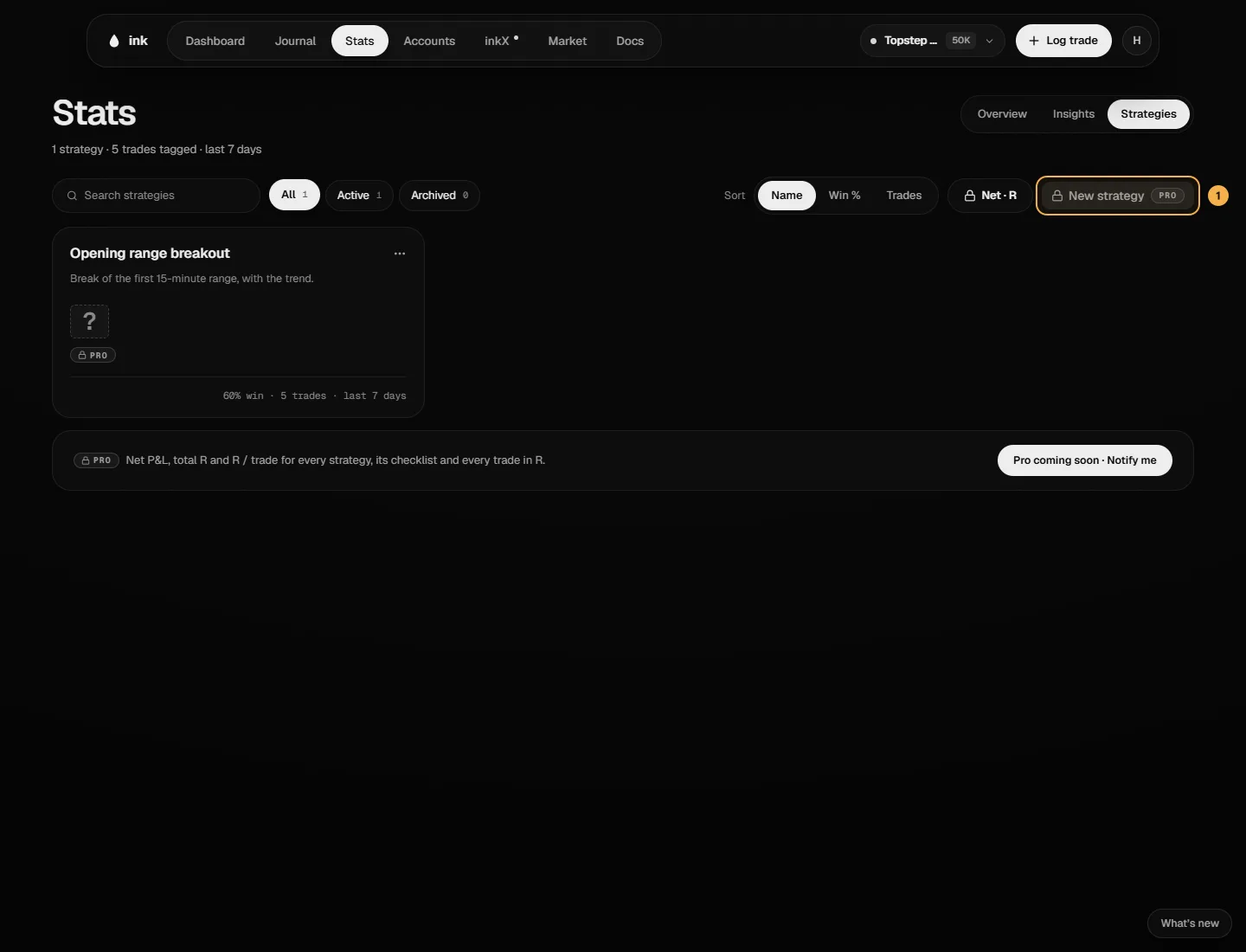
What each card shows
- Net P&L and total R.
- R / trade — the total R of trades with a risk amount, divided by how many there are. A trade's R is its net P&L ÷ its risk amount (
computeRMultiple,lib/trade-stats.ts). - Win rate and number of trades — a win is a trade whose net P&L is above the breakeven band — and your last ten trades.
Pick a card to see that strategy below: its best day and session, Checklist followed (how often you met each criterion — met ÷ the trades you answered it on, the same figure as By criterion), every trade in R, its Net, Win rate, R / trade and Avg RR (winners), then View N trades, Open strategy page and Log a trade with it. Under it, over its full history: Where it works (by session, day of week or time of day — "early read" while a row has fewer than 10 trades), the Edge finder, By criterion and Recent trades (View all N in Journal).
The stats cover the account selected in the top bar. Search, filter by All / Active / Archived, and Sort by Net, R / trade, Win % or Trades.
Edit, archive, delete
From a card's ⋯ menu, or the ⋯ on the strategy's own page:
- Edit — opens Edit strategy: change the name, description and criteria, then Save changes. Past trades keep the criteria results they were logged with.
- Archive — hides it from Log trade (a trade that already uses it can keep it). Unarchive brings it back.
- Delete — removes it for good. Its trades lose their strategy tag but keep their criteria results, grade, notes and tags. This can't be undone.
On the Free plan
- One active strategy. Archived strategies don't count. New strategy at the limit says "Free includes 1 active strategy — archive one or get Pro".
- Stats cover your full history: the trade count, win rate, R / trade and Avg RR (winners), and recent trades. Net P&L, total R, the line and last ten, best day / session, the checklist %, every trade in R and the sections below are Pro — blurred shapes under a Pro card, never your numbers. A strategy with no trades shows Log a trade with this strategy.
- After Pro ends, nothing is deleted: one strategy stays Active on Free and the rest are Read-only on Free. Use Make active to switch which one.