Tags
Every tag's results in one list — trades, win rate, R / trade, Avg RR, net P&L and its trend — for setups, feelings and mistakes.
Stats → Tags lists every tag on the selected account's trades in the period you pick, one row each.
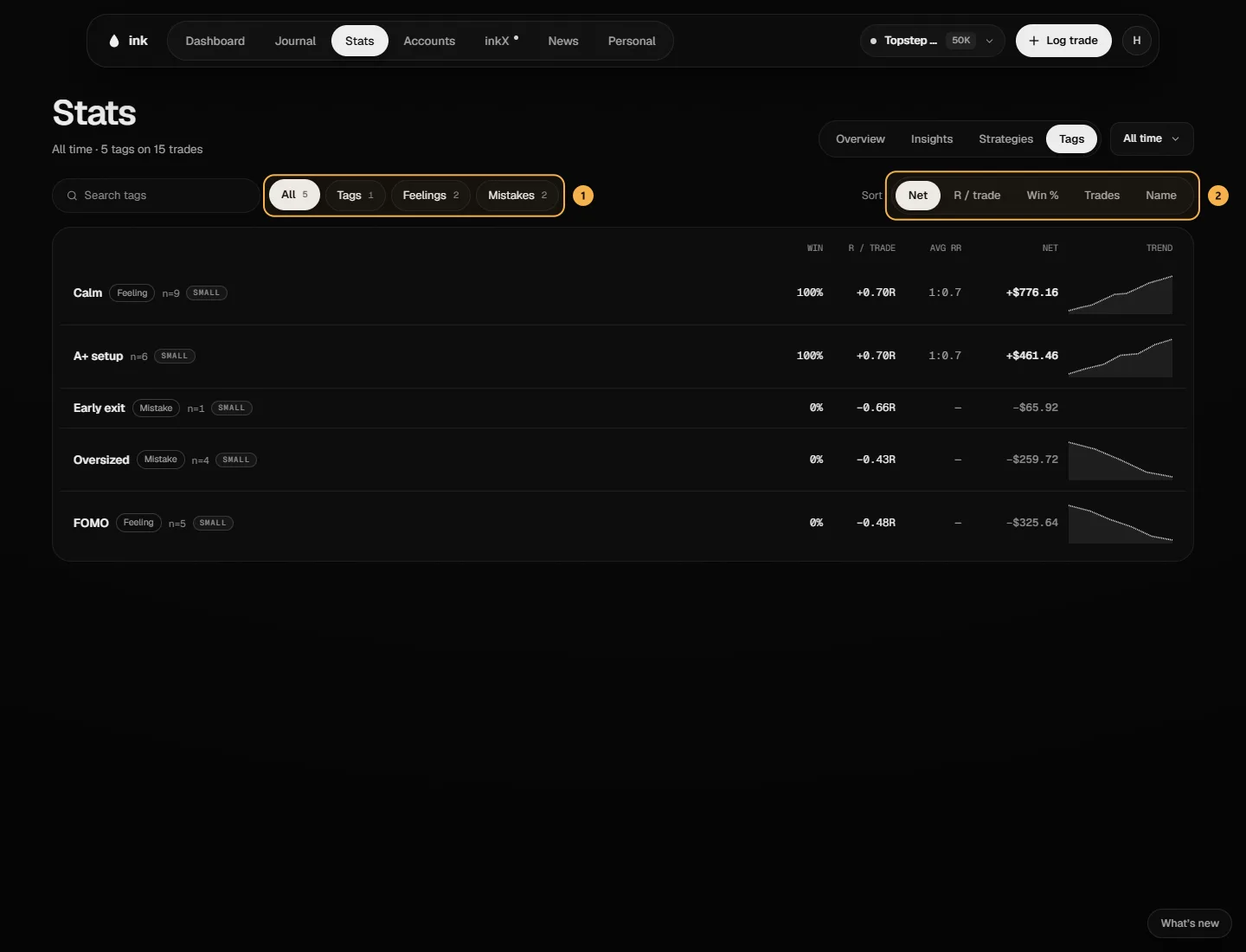
Each row
- The tag's name, marked Feeling or Mistake when it is one, and how many trades carry it. A row with fewer than 10 trades is marked Small.
- Win %, R / trade and Avg RR (winners) — worked out the same way as everywhere else. See How stats are calculated.
- Net — the net P&L of those trades.
- Trend — the running net of those trades, oldest to newest (shown from two trades up).
A trade with two tags counts in both rows. Tap a row to open the Journal filtered to that tag.
Find and sort
Search tags by name. All, Tags, Feelings and Mistakes narrow the list by kind. Sort by Net, R / trade, Win %, Trades or Name.
Tags with no trades in the period aren't listed. With none at all, the page says "No tagged trades in this window".
On the Free plan
The Tags tab is Pro. On Free it shows the table's shape, blurred, under a Pro card — none of your tags' numbers are read.